Plinth, a Design System Tool That Keeps the Source of Truth in Code:Design Systems Built for AI Collaboration (Part 3)
Oct 29, 2026 · 10 min read
Plinth is an open-source tool I'm building on Claude Code. From a one-line description of a product, or from a website whose look I like, it builds a design system in code: layered tokens, ready-made components, guidelines AI tools can read, and checks that run on every change.
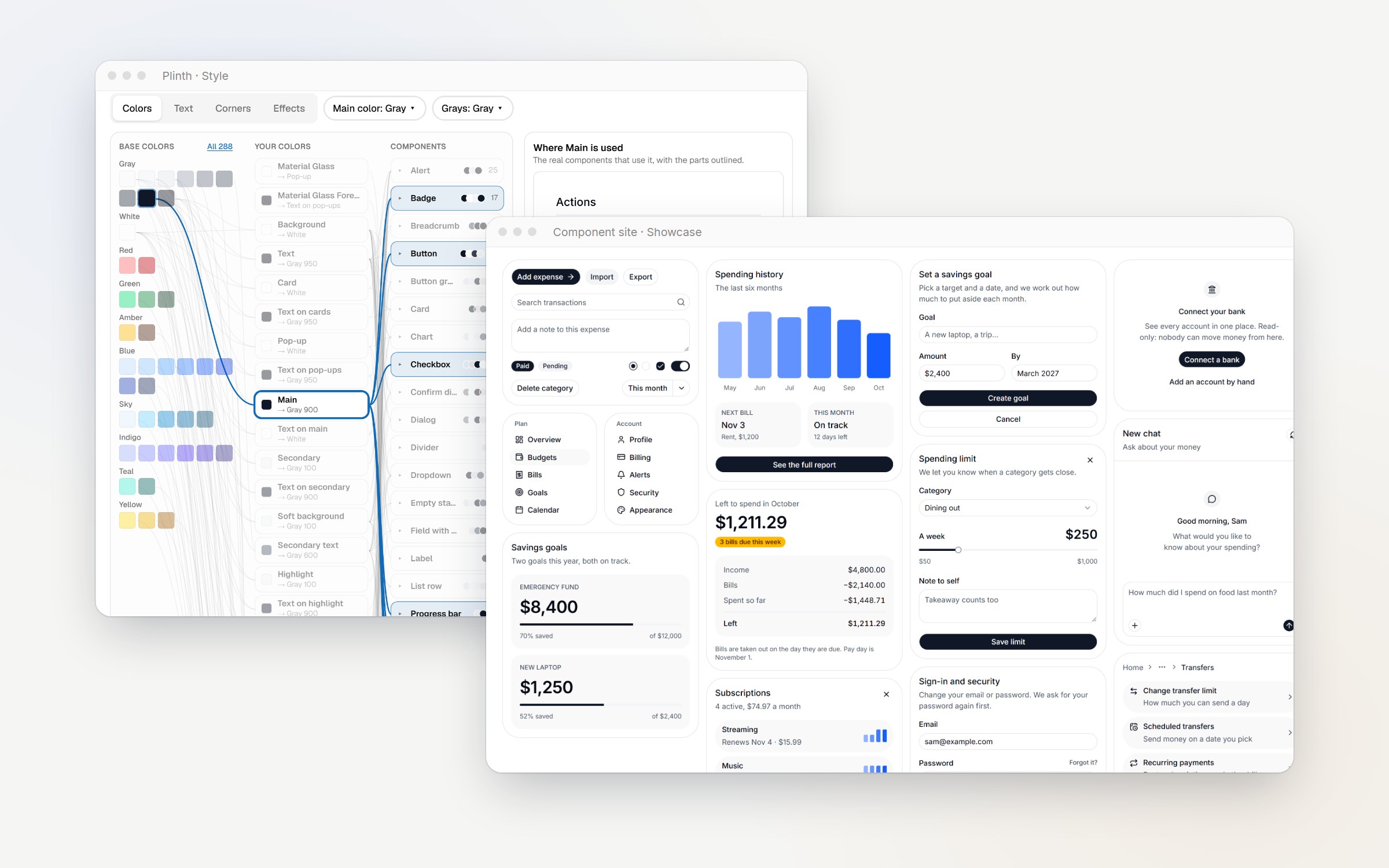
AI can generate an interface in minutes. Keeping that interface consistent, editable, and maintainable is a different problem.
When I explored AI-assisted design in Part 1 and Part 2 last year, I built a workflow around Figma Variables and Figma Make. It worked from end to end, but the design and code gradually drifted apart. By the end, editing the interface directly in Cursor was often faster than going back through the design tool.
That changed how I think about design systems.
I'm now exploring a different approach: keeping the design system in code, where its rules can be versioned, tested, and used directly by AI tools. I've been building Plinth, an open-source tool, to see how far this idea can go.
TL;DR
- Where I started: Parts 1 and 2 described a workflow that worked end to end, but design and code gradually drifted apart.
- What I'm building: A tool with a quick starting point and fine-grained control, keeping tokens, guidelines, components, and checks together in one Git repository.
- What I think now: Design work may be moving closer to design engineering. I see code as a practical home for the system's rules, with Figma potentially serving as a place to review work and collaborate.
1. A note about Parts 1 and 2
I wrote Parts 1 and 2 in November 2025. The tools have changed considerably since then, so the steps, import flow, and token limitations I described may no longer apply.
More importantly, my own approach has changed.
Both posts started on the Figma side. In Part 1, Figma Variables held the tokens, Figma Make generated the screens, and the results came back to Figma to be refined into a component library. In Part 2, Figma Make pushed the front-end code to GitHub, Cursor added the backend, and Vercel deployed it.
The code did live on GitHub, but design changes still started in Figma Make and flowed one way into the repository.
Today, I'm working in the opposite direction. I want the source of truth to live in code, with Figma as an optional way to work with the system.
I'm keeping the earlier posts as a record of how I approached the problem at the time. For my current approach, start here.
2. What the earlier workflow left unresolved
Looking back, I had already identified several problems. I just hadn't found a better way to solve them.
- Generation was fast, but the workflow was one-way. Once code left Figma Make, it was difficult to bring it back into the design layer.
- Visual details drifted. Gradients, shadows, and SVGs could change during conversion.
- There were several competing sources of truth. Figma Variables, the code generated by Make, and the GitHub repository could all change independently.
- Editing in code was often faster. Late in the project, making changes directly in Cursor took less time and used fewer AI tokens.
That last point stayed with me. If the work ultimately needs to be changed in code, it is worth asking whether the system's source of truth should start there, too.
3. What I wanted: a quick start with fine-grained control
Part 1 began with Relume, whose strength is clear: a description can become a sitemap, wireframes, and a style guide in minutes, backed by a large component library.
I also noted that its customization options were limited, though they were useful for getting started. Its visual styles tended to suit familiar marketing sites.
I wanted that same fast starting point, but with every color, corner radius, font, and component detail still editable.
I also wanted support for less common styles and more deliberate design constraints, such as:
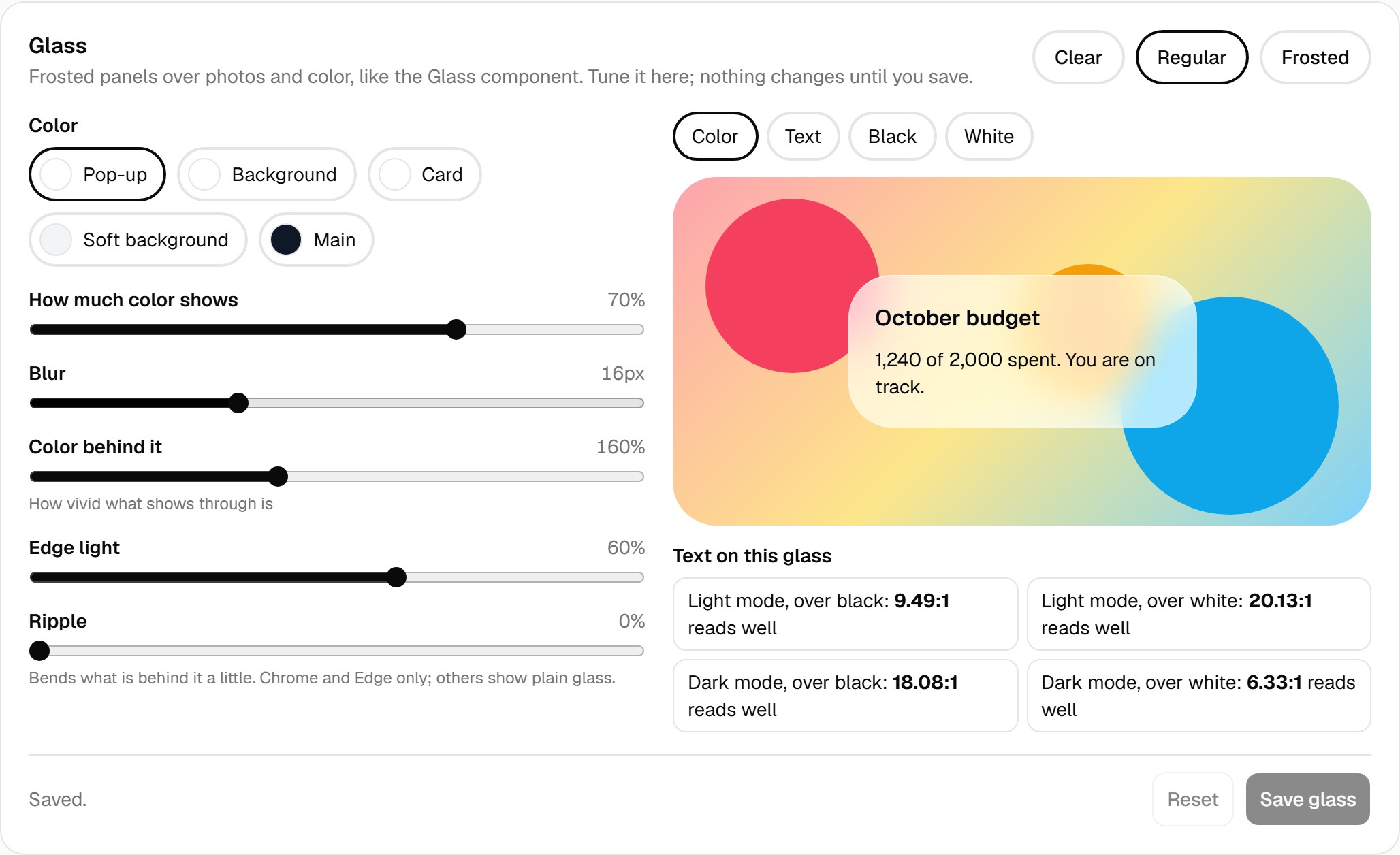
- Frosted glass: Check text readability against both light and dark backgrounds.
- Chart colors: Derive a chart palette from the main brand color and check that the colors remain distinguishable for people with color-vision deficiencies.
- Fitted corners: Treat inner and outer corners separately so that elements inside a container follow its shape.
- Typography: Use different fonts for headings, body text, and buttons when needed.
Relume is also moving toward AI-assisted editing and has added ways for AI tools to read its library. I think that direction makes sense. I want to explore a similar fast workflow, while keeping the system's rules closer to the code that uses them.
4. Why the system still needs an interface
If the design system lives in code, why not ask an AI agent to edit the files directly?
For small changes, that can work well. But design decisions often depend on visual judgment, and that is harder to do through code alone.
Design decisions need to be seen in context. A change to a color or corner radius can affect dozens of components across brands and modes. To judge the result, I need to compare those components side by side. A diff of token files cannot show the whole picture.
Design properties keep evolving. Frosted glass, mode-specific shadows, fitted corners, and motion all introduce settings that standard tokens may not fully describe. Designers need ways to adjust those settings without losing control over the details.
Some checks are better automated. Text contrast, focus indicators, readability over translucent surfaces, chart colors, and component accessibility can all be checked more consistently by a program than by relying on memory. These checks should run every time the system changes.
Visual judgment and automated feedback need to work together. Whether glass looks convincing or an animation feels calm is not something a number can decide on its own. I want to adjust a setting and see the component change, while the program flags the moment the text becomes unreadable.
That's what the interface is for: putting components in one place, exposing their settings as visual controls, and running checks while I work.
In Plinth's glass editor, for example, text readability is checked against light and dark backgrounds as I adjust the effect. If the text fails, Plinth suggests the lowest opacity that passes the check.
Motion does not have its own controls yet. That is one of the next areas I want to explore.
The files remain the source of truth. The interface is where a designer can work with them visually.
5. A design system with code as its source of truth
This is the model I'm working toward. Some parts already work in Plinth; others are still plans.
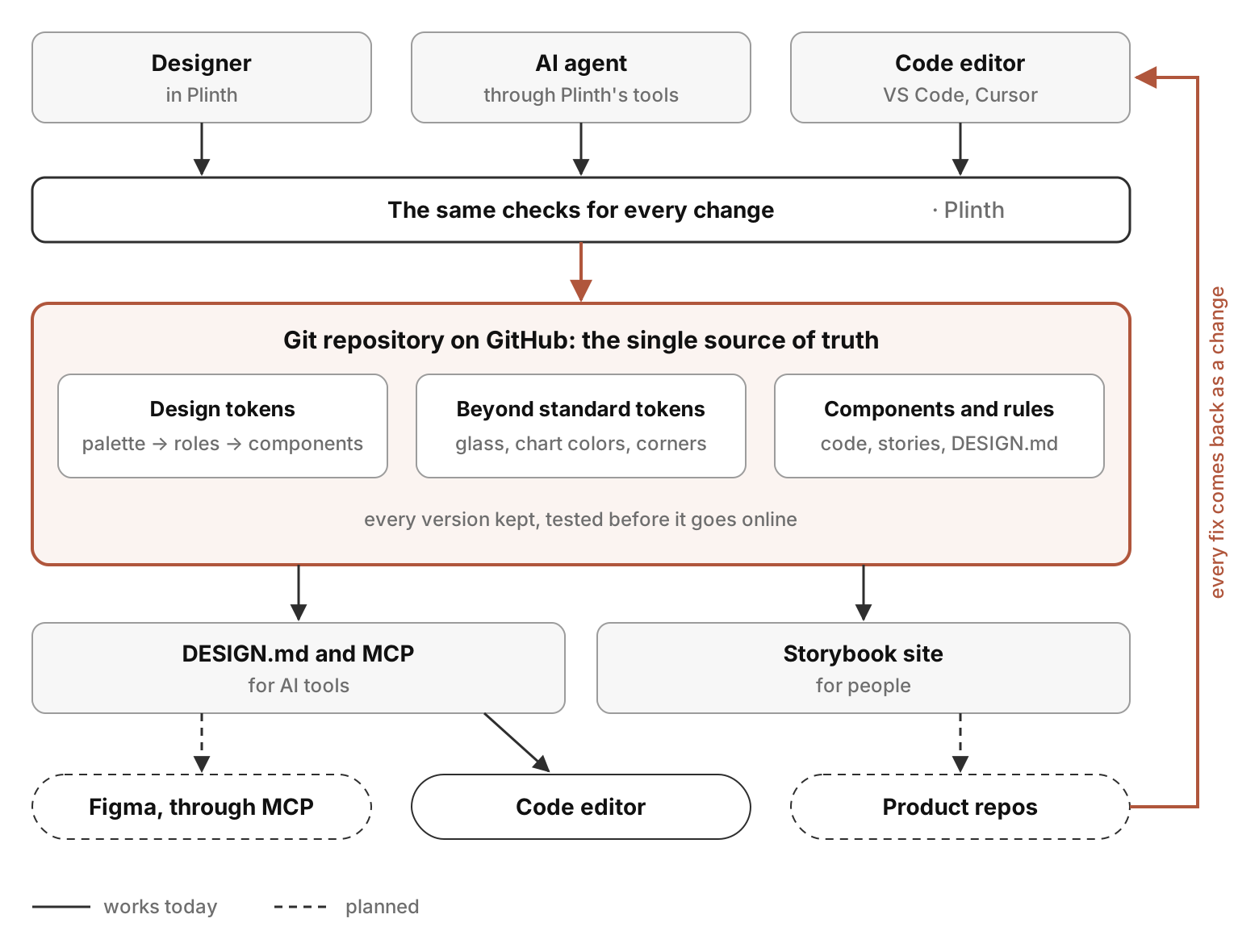
The workflow has three ways to make changes, one shared set of checks, and one Git repository. GitHub keeps the history and runs tests before a release. People can explore the system through a component site, while AI tools can read its guidelines and component information. Changes made through any supported route should go through the same checks.
Make a change
A designer can work in Plinth's interface or describe a change in plain language. An AI agent can use Plinth's tools. A developer, or a designer who codes, can edit the files directly in an editor such as VS Code or Cursor.
Check it
Plinth runs the checks that can be automated: text contrast, color relationships, chart-color distinguishability, and the reach of a change across components. Changes made directly to files should go through the same checks.
For me, the important principle is that every change should meet the same standards, regardless of which tool or person made it.
Keep it in one repository
The repository holds four broad kinds of information.
Standard design tokens. These follow a familiar three-layer structure: base palette values, semantic roles that reference those values for each brand and mode, and component tokens that reference the semantic roles. The base layer starts from Tailwind CSS: its color palette, its corner and shadow scales, and its spacing unit, so every design system begins from well-tested units. The values stay customizable: a brand color gets its own full scale next to Tailwind's, and roles can point at any step, so colors and corners can move away from the defaults wherever the brand needs it.
Design properties that need more than standard tokens. For these, I want to store the parameters and let the program calculate the output. Glass effects, for example, can store color, opacity, blur, and edge light, then generate CSS with fallbacks and readability checks. Chart colors can be derived from the main color and saved as references to the palette, keeping them editable. Fitted corners can store the parent container and the gap between elements. Shadows can have separate values for each mode, and motion should always have a reduced-motion alternative. Gradients remain an open problem.
Guidelines that are best expressed in words. Brand character, do's and don'ts, and writing voice belong in files such as DESIGN.md and WRITING.md. AI tools can read these guidelines, and an AI review can check proposed changes against them before publishing.
Components built on an existing library. Components start from a proven library instead of from scratch. Plinth's catalog is built on shadcn/ui and its Radix primitives, so keyboard behavior and accessibility come with them, and each component is rewritten to read only its own component tokens. Keeping up with shadcn's updates, and supporting other libraries such as Material, are among the next areas I want to explore.
Test and publish
GitHub keeps the version history. Before a release, the workflow runs the automated checks and component tests. If a check fails, the last known-good version remains online.
Explore and use the system
People can explore tokens, components, and guidelines on a Storybook site across brands and modes. AI tools can access the same information through the guidelines and Storybook's MCP server.
A designer could eventually bring the system into Figma through MCP, or build screens directly in a code editor. Product repositories could consume the components and theme through a registry. Of these integrations, direct work in an editor is the part that works today; the others are still planned.
Bring feedback back to the source
A comment in Figma or a bug found in a product should ultimately lead to a change in the repository and pass through the same checks. The goal is to avoid maintaining a separate, competing copy of the system.
6. Plinth today
Plinth runs locally on my computer and is driven by Claude Code. It currently has four steps.
- Describe: I describe the product in a sentence, and Claude suggests the next details with a short explanation for each. I can confirm or edit the suggestions rather than starting with a blank form. Or I paste the address of a website whose look I like, and Plinth reads its colors, corners, and fonts as the starting point.
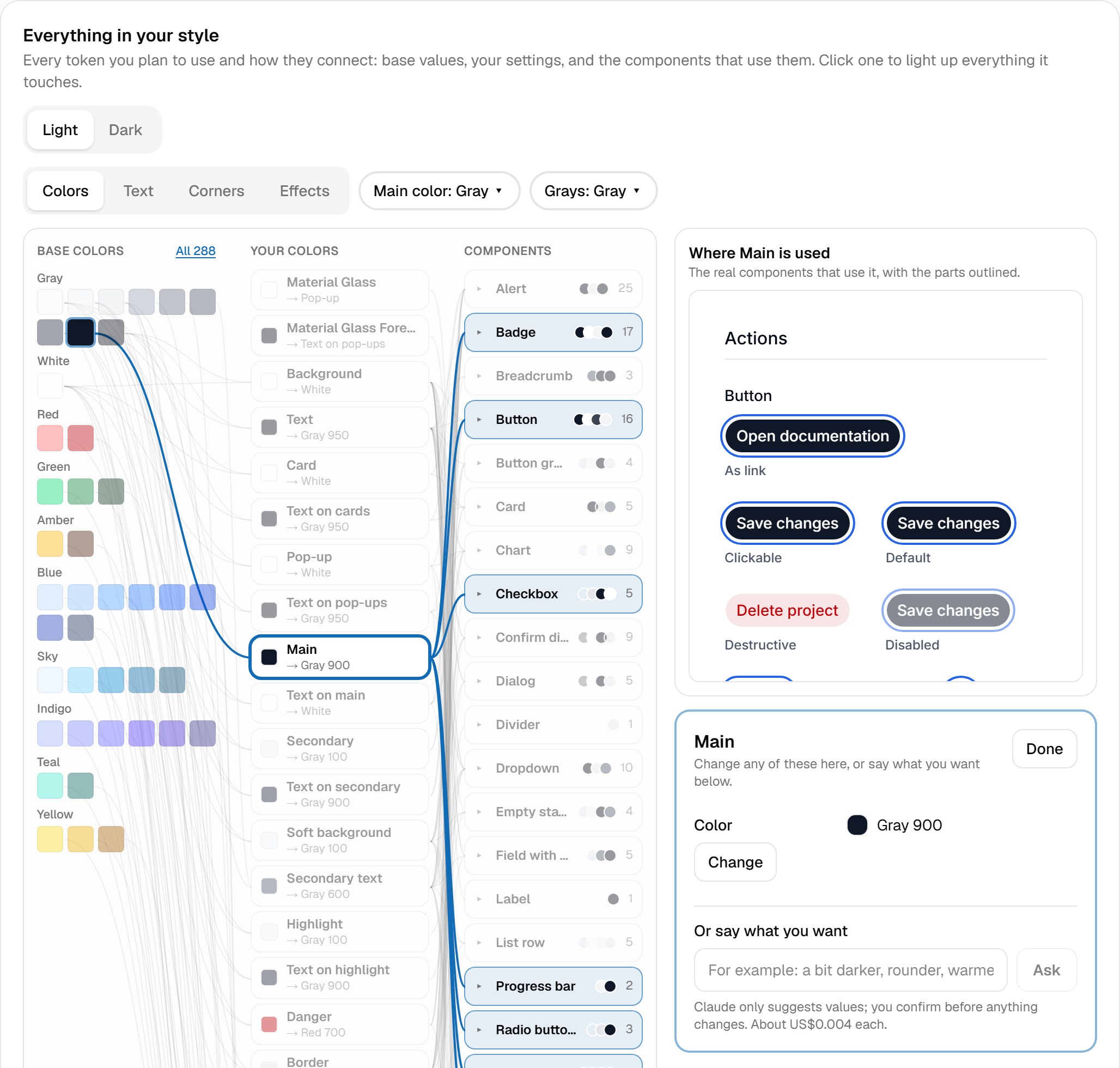
- Style: A map of the planned tokens shows base values, brand colors, shared settings, and the components that use them. Selecting a token highlights its connections and shows the components affected.
- Components: Components appear together on one page. I can select a part to edit it. If a color is shared, Plinth counts how far the change reaches and asks whether it should affect only the selected component or every component that uses it.
- Publish: Plinth pushes the system to GitHub, where checks and tests run before the component site is updated.
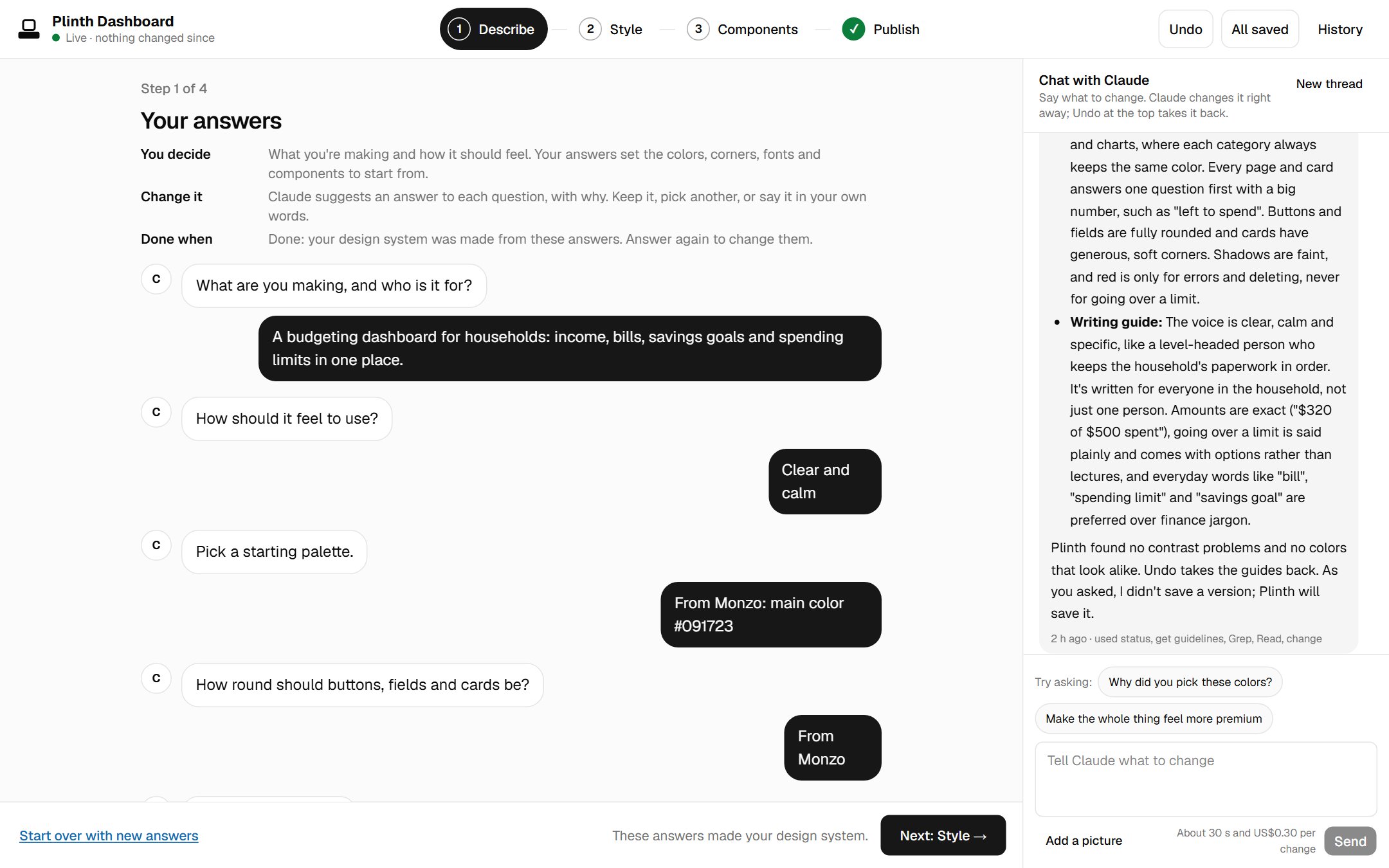
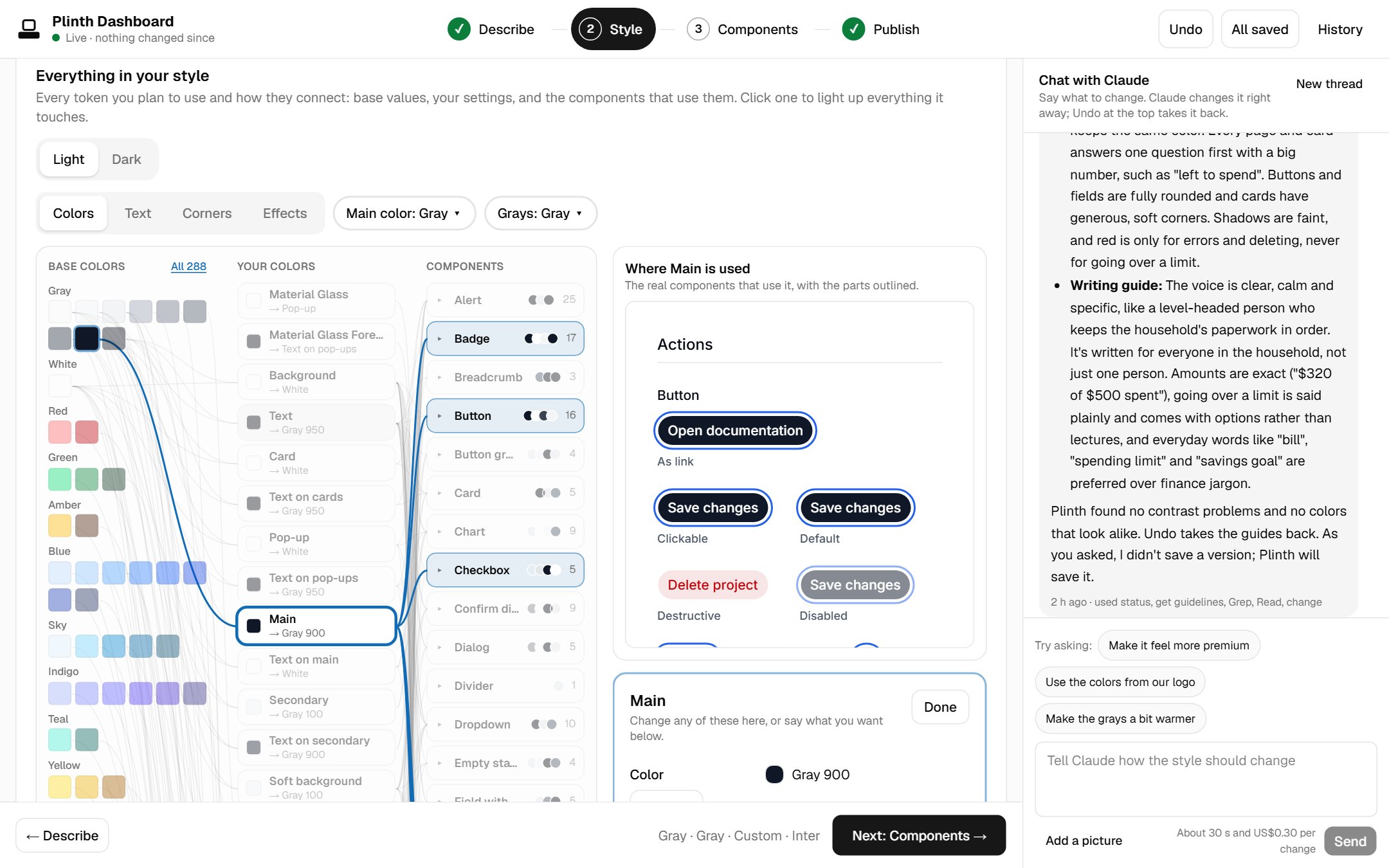
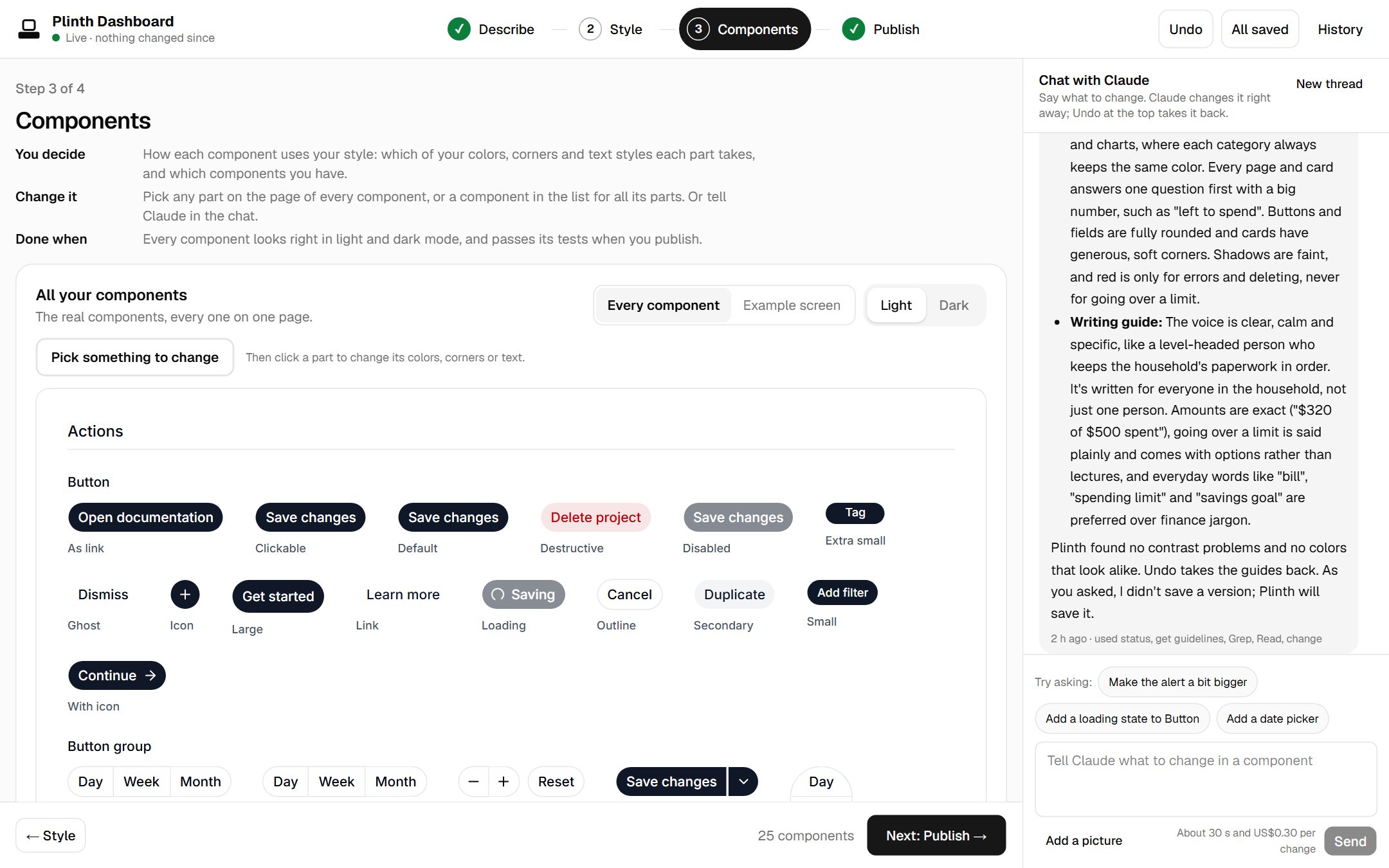
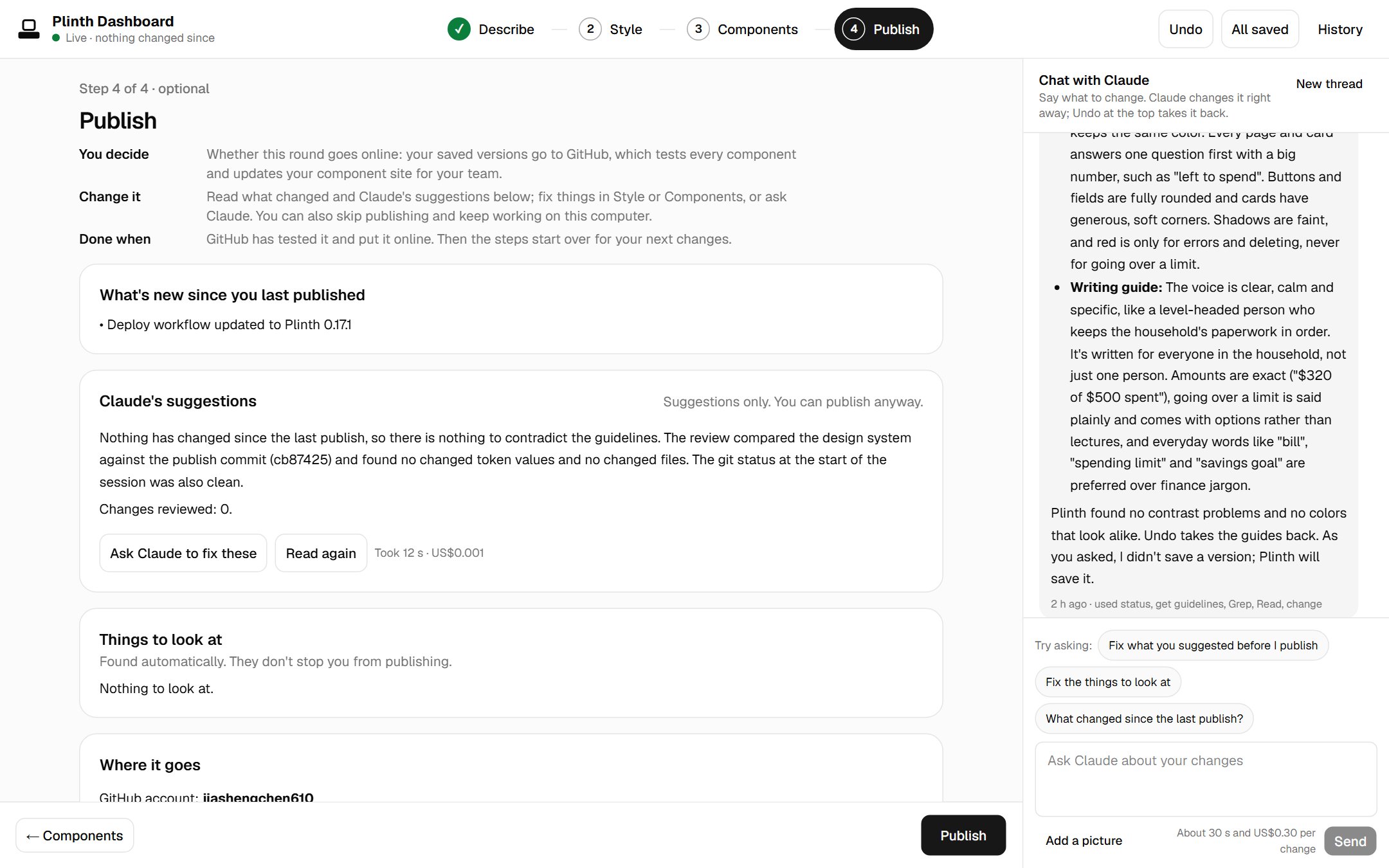
Describe: the answers that made this design system. Claude suggested each one with a reason; the look came from a website.
Two principles have guided the build.
AI drafts; a person confirms. Names, version notes, and suggested answers are filled in ahead of time. The person can confirm or edit them instead of starting from an empty field.
Let programs calculate what they can. Text contrast, color scales, chart colors, and the scope of a change should be calculated rather than guessed. AI helps interpret what I want; the program handles the measurable parts.
After publishing, the component site, the guidelines AI tools read, and the version history are all available through GitHub. The site opens on an example screen, a small dashboard built only from the system's components, so the whole style can be judged at a glance.
7. Why I lean toward code
This is my current view, and I'm still testing it.
I see design work moving closer to design engineering. A designer's output increasingly includes component code and design tokens alongside the screens themselves.
When code is part of the deliverable, keeping the system's source of truth in code has practical benefits:
- A complete history: Changes can be reviewed, and earlier versions can be restored.
- Repeatable checks: Contrast, broken references, and hardcoded values can be checked automatically before a release.
- A format AI tools can read: With tokens in the DTCG format and guidelines in
DESIGN.md, tools such as Claude Code or Cursor can work from explicit rules instead of guessing from screenshots.
Code does not describe every design property neatly yet. Shadows, gradients, and motion are only partly covered by today's token formats. I'm using Plinth to explore how to represent those gaps without making the system harder to maintain.
8. And Figma?
This part is a hypothesis, not a conclusion.
I can see Figma continuing to be useful as a place for people to work together: reviewing options side by side, leaving comments, comparing directions, and discussing work with people who don't work in design every day. Code is not a particularly good replacement for those activities.
For the system's underlying rules and values, though, I lean toward keeping them in code and showing their results in Figma. In that arrangement, Figma becomes a view of the source rather than a separate place where the rules must also be maintained.
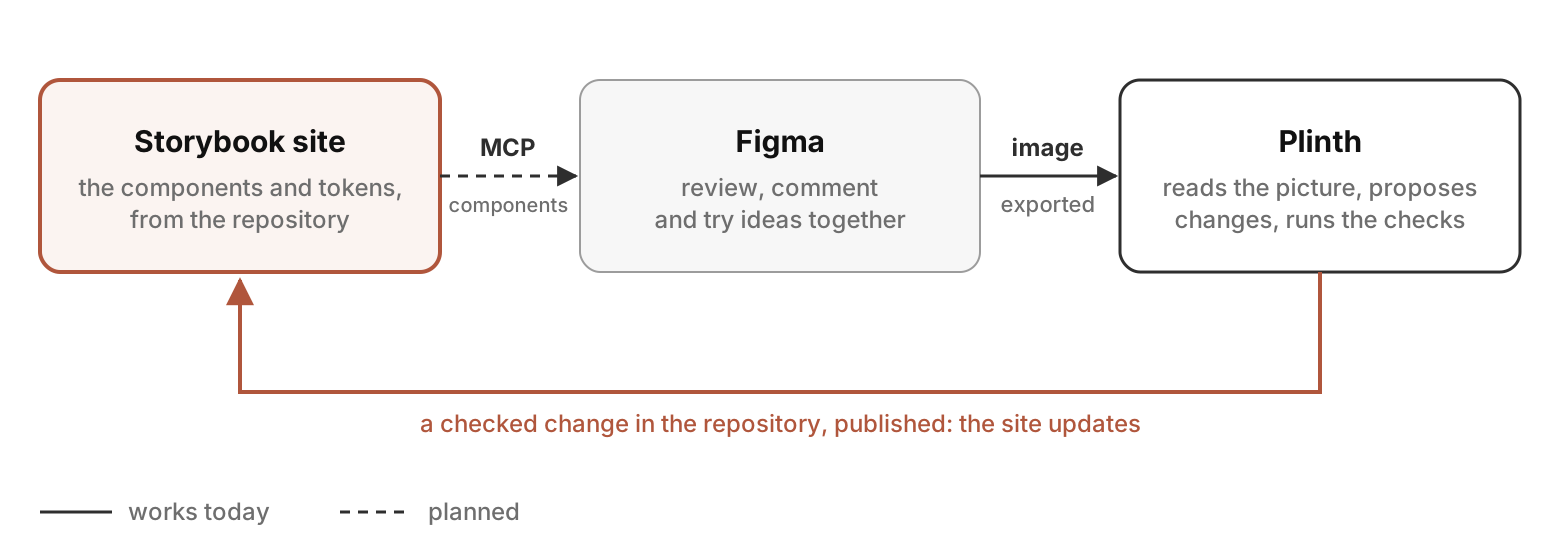
Figma is developing ways for AI tools to read design files, and the tools around design systems will continue to change. I don't know what role Figma will settle into a year from now. This is simply the direction I'm exploring today.
9. Current limitations
Plinth is still in an early alpha stage, and there are important limitations:
- It has only been tested on Windows 11, and very few people have used it.
- It requires Claude Code. Creating a design system currently costs about US$0.35, and each change made through chat costs about US$0.30.
- Some less common visual effects remain limited. For example, the kind of edge refraction seen in iOS glass effects is not currently achievable on the web in the way I want.
- The product integration workflow is not built yet. Connecting a finished system to a product repository is the next major step.
These limitations are part of the experiment. I want to understand which parts of the approach are useful in practice before treating the model as a finished solution.
10. What's next
The next steps are to:
- Let product repositories consume components and themes directly through a shadcn registry.
- Keep up with shadcn's changes and explore support for other component libraries.
- Expand support for less common visual styles.
A year ago, I was focused on helping AI understand design. Now I'm exploring how to keep design rules in one place and make them testable.
Plinth is my attempt to put that idea into practice. The approach is still evolving, but the goal is clear: a design system that people can shape visually, that code can enforce, and that AI tools can use without having to infer every rule from a screenshot.