Design Systems Built for AI Collaboration (Part 2):A Design-and-Deployment Experiment from Figma Make to Vercel
Nov 20, 2025 · 3 min read
Part two tests one thing: whether Figma Make can hand off cleanly to GitHub and run all the way to deployment, while keeping a single source of truth and reusable components.
TL;DR
- Goal: Find out whether design to deployment actually works:
Figma Make → GitHub → Cursor → Vercel - Strategy: Figma Make handles the front-end screens, Cursor handles the backend on a separate branch.
- Result: The flow runs end to end, but design updates were less smooth than expected. A lot of the time, editing the UI directly in Cursor was faster and used fewer tokens.
1. How Figma Make and GitHub work together
The main thing I wanted to find out here was whether the code Figma Make generates can really land in GitHub and then plug into a Cursor development flow.
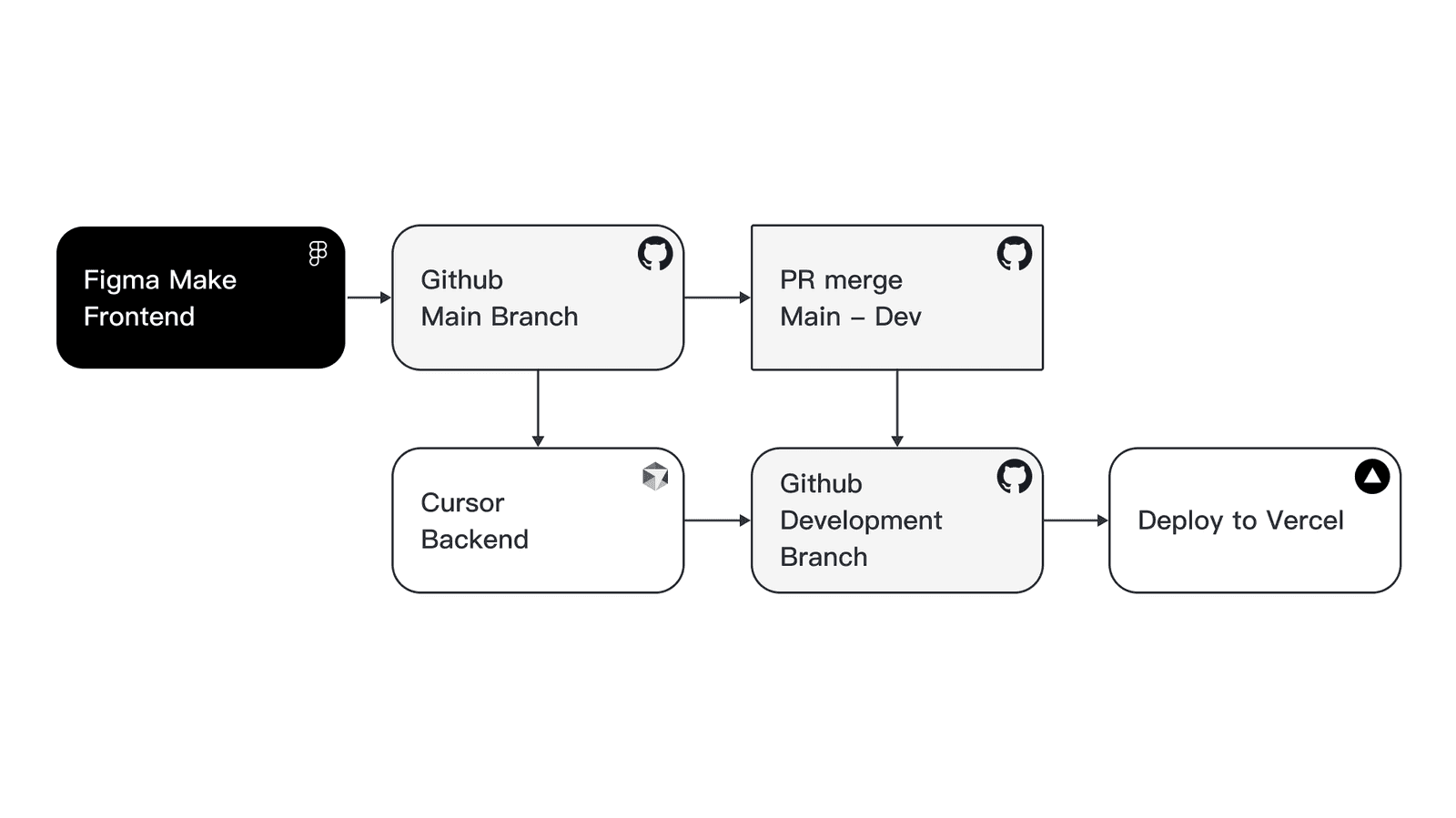
My approach was to let Figma Make output the front-end code straight to the GitHub main branch, handle the backend with Cursor on a separate branch, and merge them with a PR at the end.
The rough split was:
- Figma Make handles the screens and layout
- Cursor handles the API and data logic
- GitHub handles version control
I started a new repository and synced the Figma Make project into it.
The main things I was watching for:
- Whether the components Figma Make generates can land in GitHub and stay an SSOT
- Whether variables and design tokens stay consistent
- Whether components are reusable
- Whether design changes flow cleanly into development
Structurally, Figma Make stays on the main branch handling the screens, the backend sits on a separate branch, and both eventually merge into a deployable version.
2. A minimal backend with Cursor
Since this was just a flow check, the backend stayed very simple.
Cursor mainly did a few things: fetch exchange rates, fetch crypto prices, basic rate limiting, and return cleaned-up JSON.
It can read the front-end structure synced down from Figma Make and add the APIs on top of it.
This time I deliberately kept it at MVP level: a few endpoints plus a stable data format.
Then I worked backward from the UI to the data it needed, such as:
- Rate cards
- 15-day price chart
- Buy/sell signal gauges
- Volatility range
- Asset allocation
Then I mapped those to external data sources, such as CoinGecko and the ExchangeRate API.
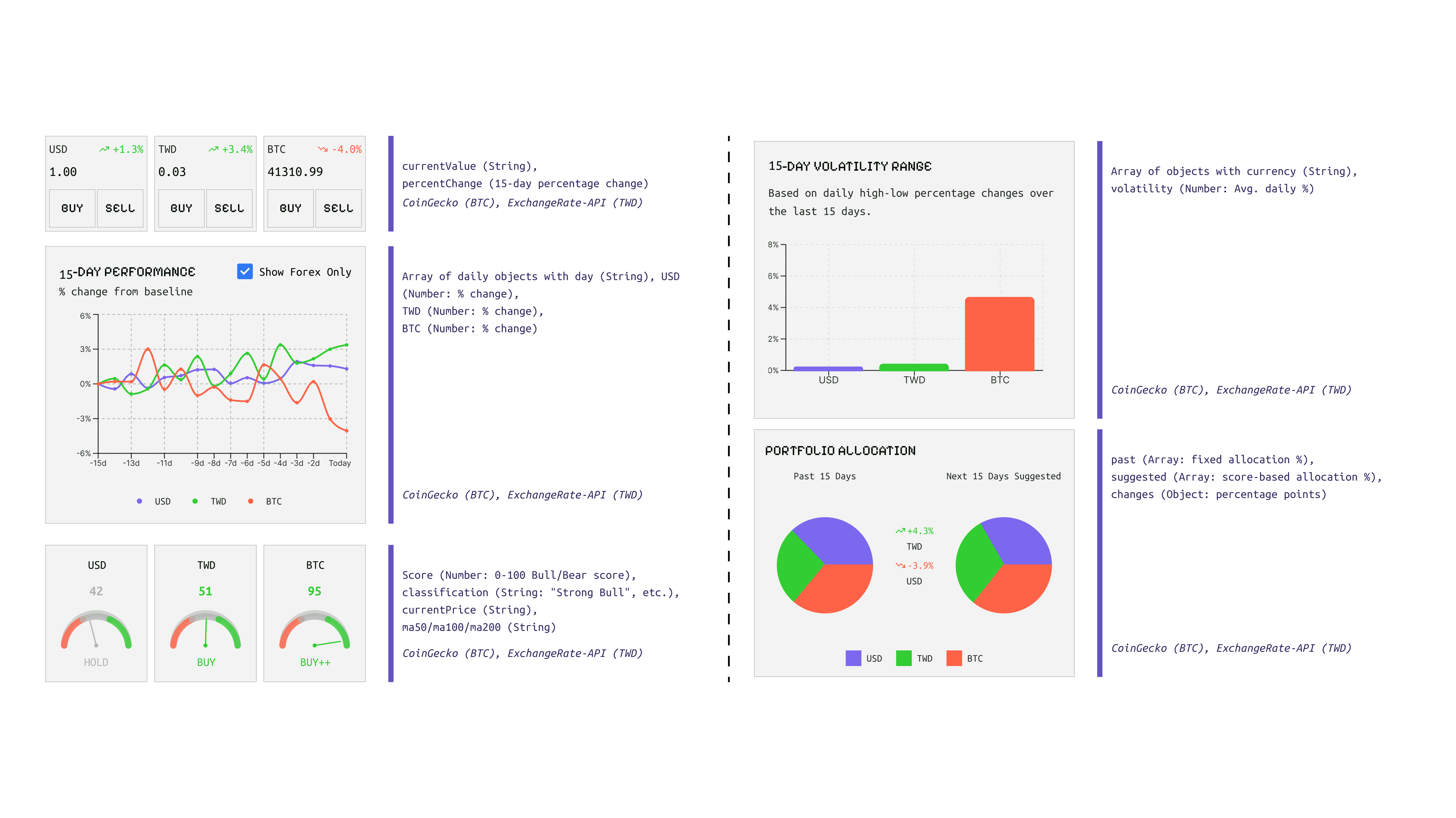
The key part of this step was building the mapping between UI and data, so each component knows exactly what it pulls.
3. Deploying to Vercel
With both front end and backend on GitHub, and since there was no login and no database, I deployed straight to Vercel.
This step was less about testing performance and more about confirming the whole flow could actually run end to end: Figma Make → GitHub → Cursor → Vercel.
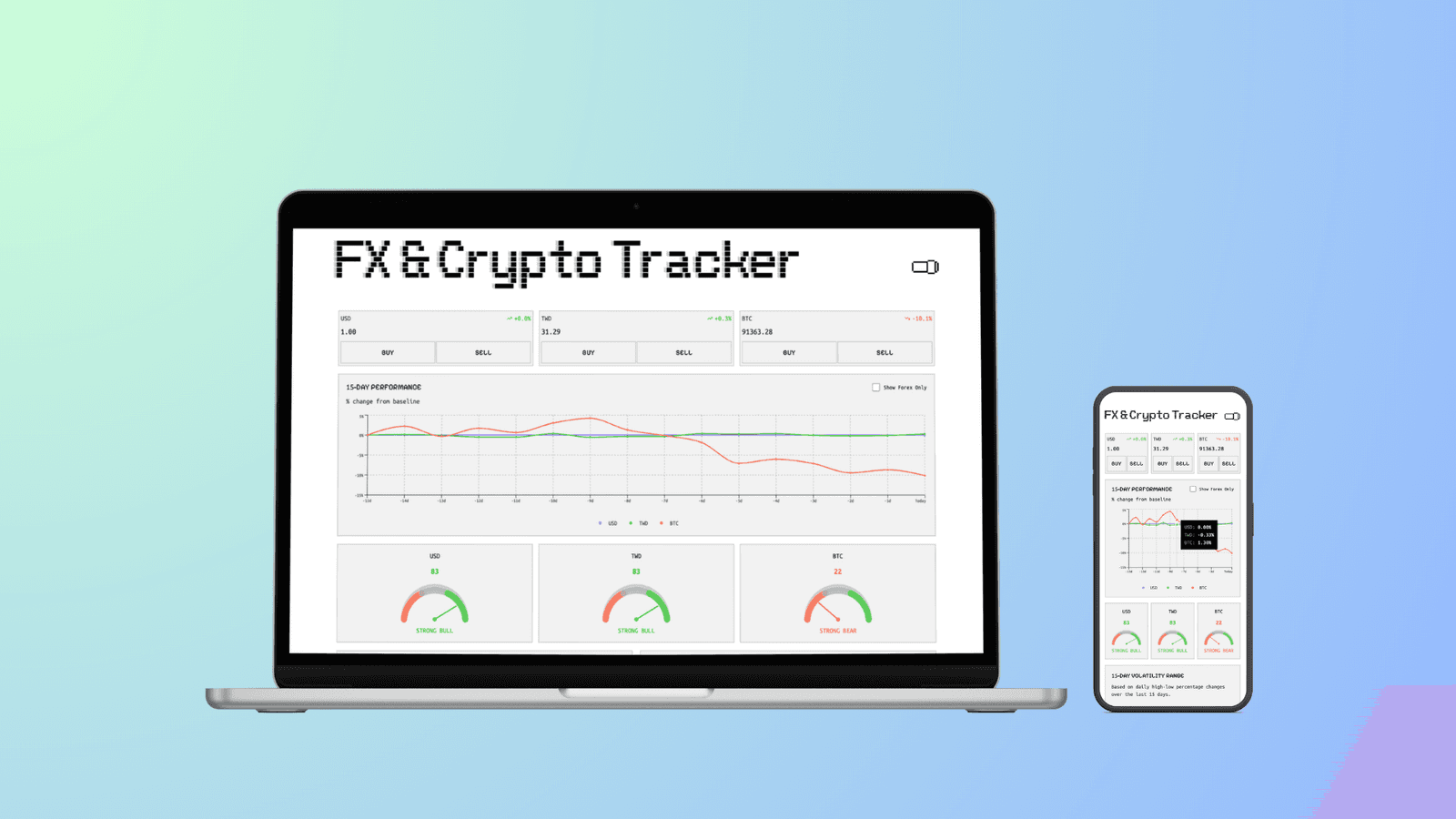
It went better than expected. After the first successful deploy, later changes redeployed quickly too.
4. Testing the design-update flow
Once it was deployed, I started testing whether design changes would affect the flow.
I made a few small tweaks in Figma Make:
- Switched the font from Pixel Sans to Ubuntu Mono to make numbers easier to read
- Adjusted the modal layout so the mobile keyboard would not cover the content
- Fixed corner radii and contrast
After confirming, I synced back to GitHub, opened a PR, and merged into the branch that triggers Vercel.
The flow works, but making the tweaks inside Figma Make was less worth it than I expected.
One clear problem is that the design files Figma Make generates carry small detail errors, and right now it is almost entirely a one-way export. When I fed the original design back in, it often missed the details, and sometimes a plain screenshot was actually more accurate.
Through this experiment, I started to feel that editing the UI code directly in Cursor is faster.
Cursor's advantages are clear:
- Fast prompt iteration
- Results visible right away on localhost
- Low cost to make changes
- Lower token usage
This time, about 70 prompts used up Figma Make's 3,000 tokens.
5. Takeaways
The flow runs end to end: Figma Make → GitHub → Cursor → Vercel.
The problem is not the architecture, it is the gap that still sits between Figma Make and the design tool.
Once AI-generated UI code leaves Figma Make, it is hard to bring it back to the design layer for fine-tuning, and design and code end up going their separate ways.
Right now, Figma Make looks more like another generation tool, while Cursor is closer to the real center of development.
If Figma can genuinely connect Make and the design tool in the future, designers might be able to design, adjust, and even deploy all in one environment.
For now though, Figma Design and Figma Make are two different product lines. As tools like Cursor keep maturing, Figma Design's role may gradually narrow into a visual and collaboration tool rather than part of the actual development flow.