Making AI Data Centers Visible:A 3D Site Exploration of Modular Facilities
Oct 26, 2026 · 7 min read
An unofficial modular AI data center site simulator, built mostly on public data with a three.js front end. Based on NVIDIA DSX POD and GIGABYTE GADU, it compares estimated space, energy and cost across climates and scales in the browser, and exports OpenUSD that opens in NVIDIA Omniverse.
AI applications are growing fast, and they run on enormous amounts of compute. How to build AI data centers faster is becoming one of the central questions in AI infrastructure.
On October 21, NVIDIA CEO Jensen Huang introduced DSX POD in his GTC Berlin keynote: an AI data center design that pre-integrates compute, networking and cooling into modular units to shorten on-site deployment. The keynote left me with a question. If AI infrastructure can scale out in modules this quickly, how should we understand what it asks of a real site?
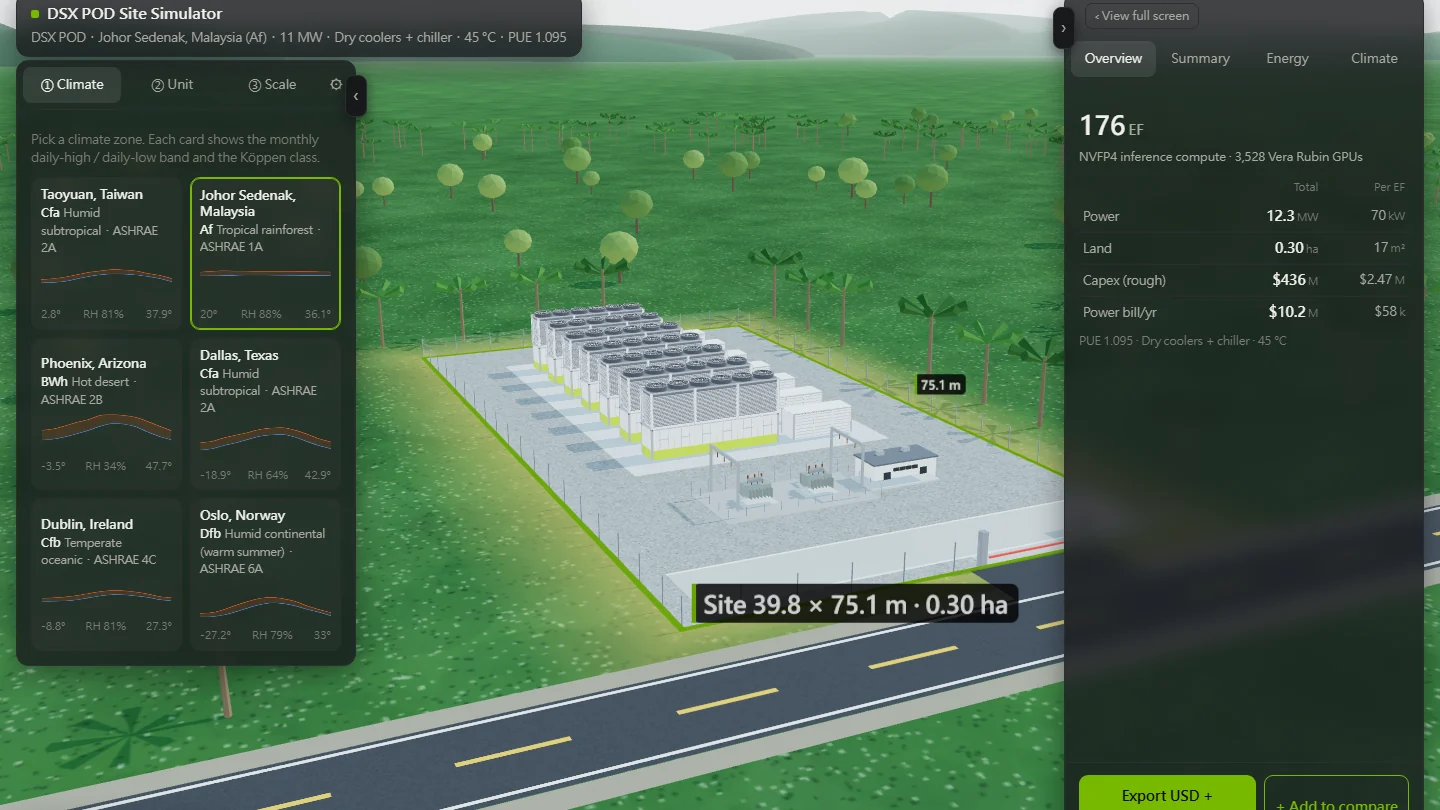
Data centers are usually described in megawatts or gigawatts, but a capacity figure says little about how much ground the equipment covers, what the local climate is like, or how energy demand relates to cost. These questions also cut across land, power and engineering, and helping people from different backgrounds understand each other's concerns is a part of planning worth exploring.
Modular design is gradually becoming a mainstream approach to building AI data centers. Alongside NVIDIA's DSX POD, GIGABYTE showed its containerized GADU at COMPUTEX Taipei this year, packing compute, cooling and power distribution into a transportable unit.
So I started an exploration project on modular AI data centers. Using infrastructure such as NVIDIA DSX POD and GIGABYTE GADU as references, I set out to build a prototype that runs in the browser, where people can switch regions, adjust the equipment configuration, and compare how space, climate, energy use and estimated cost change.
I chose an interactive 3D site simulation as the way in, and went a step further by exporting the model as OpenUSD so it opens in NVIDIA Omniverse USD Composer. Along the way I also had to work through layout logic, data consistency, performance and export validation.
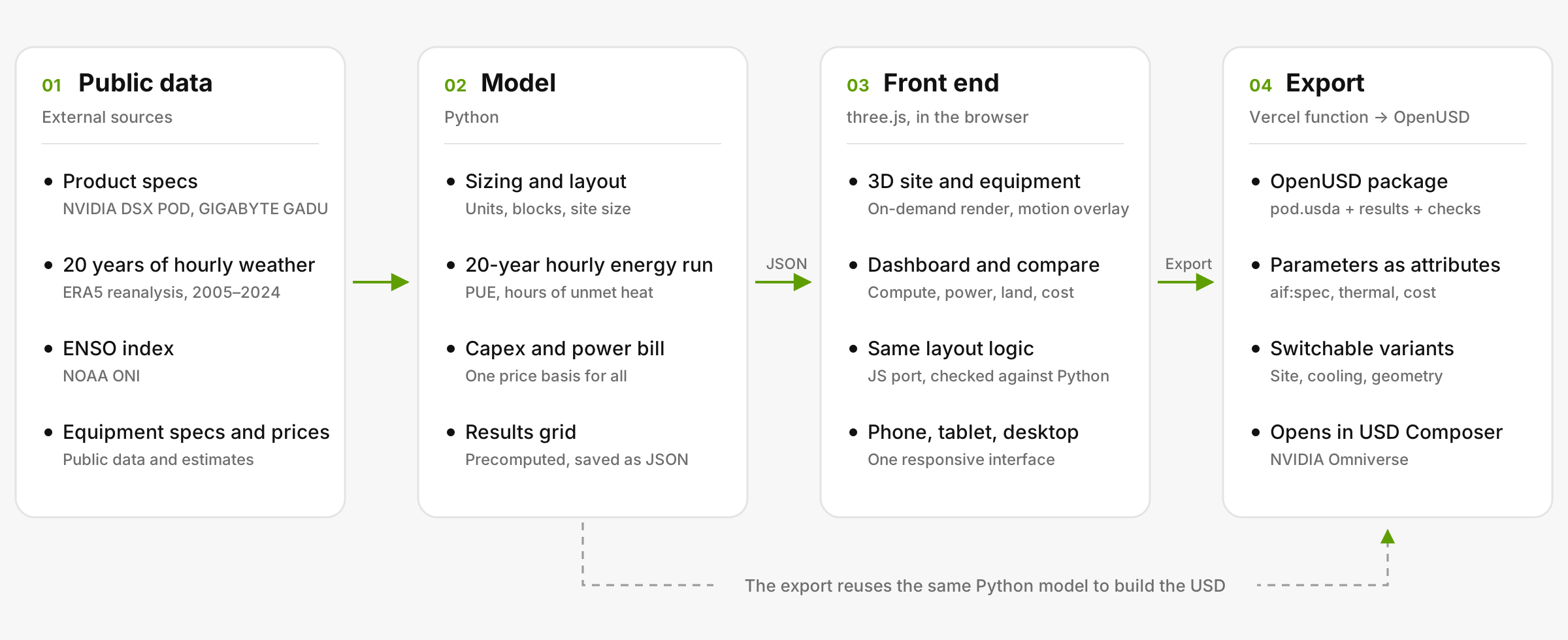
What I wanted to explore was how to turn complex specifications and data into something easier to understand, operate and compare, and how to take that design idea all the way to a working prototype.
What follows covers the design thinking, the build, and the limits that remain.
Starting from a product question
I wanted people to be able to change the conditions directly and see what each choice leads to, without first having to understand complex equipment specs or read through documentation.
So the interface is built around three main actions:
- Choose a site: compare the climates of different regions.
- Configure the equipment: adjust the product mix and scale of DSX POD and GADU.
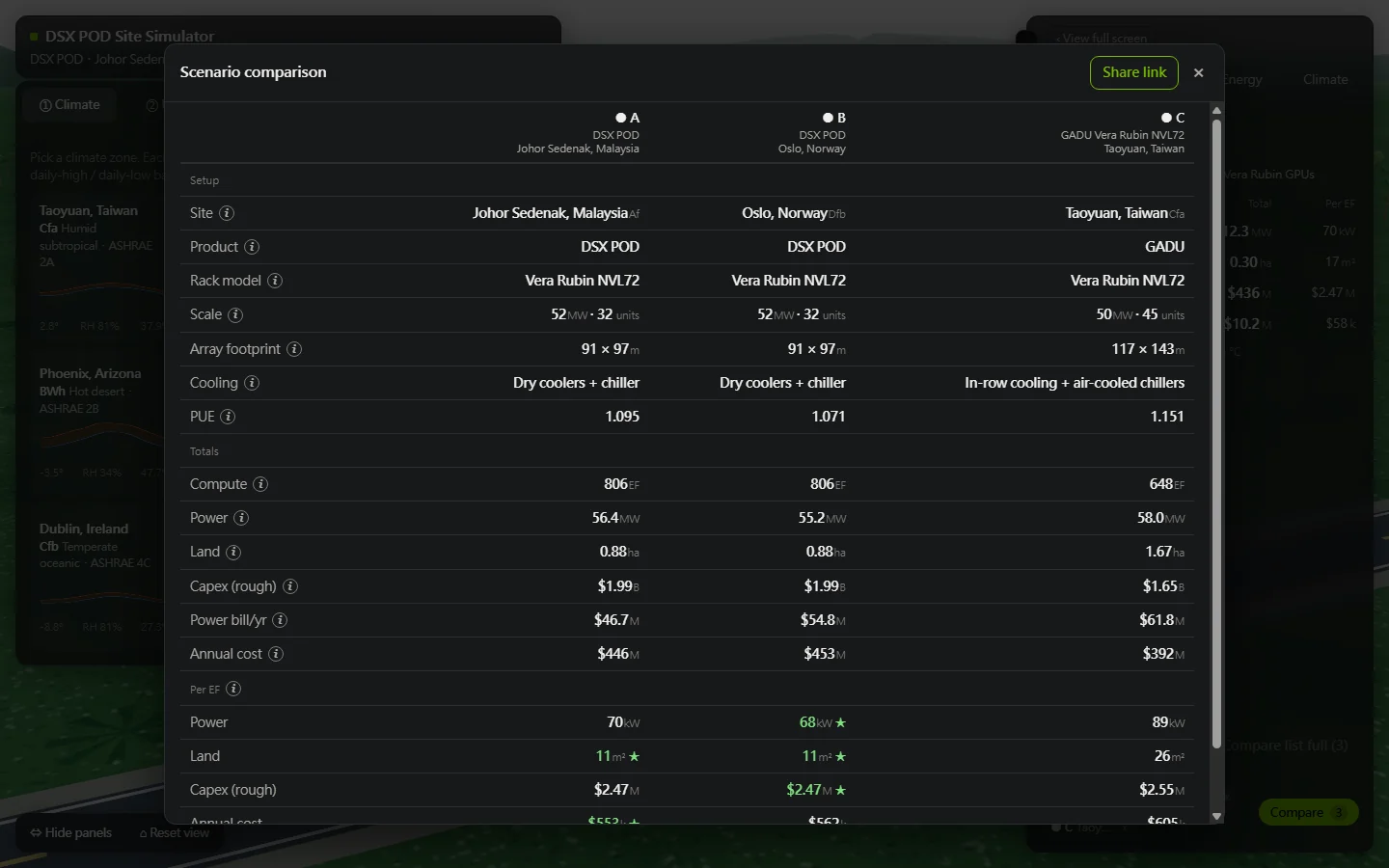
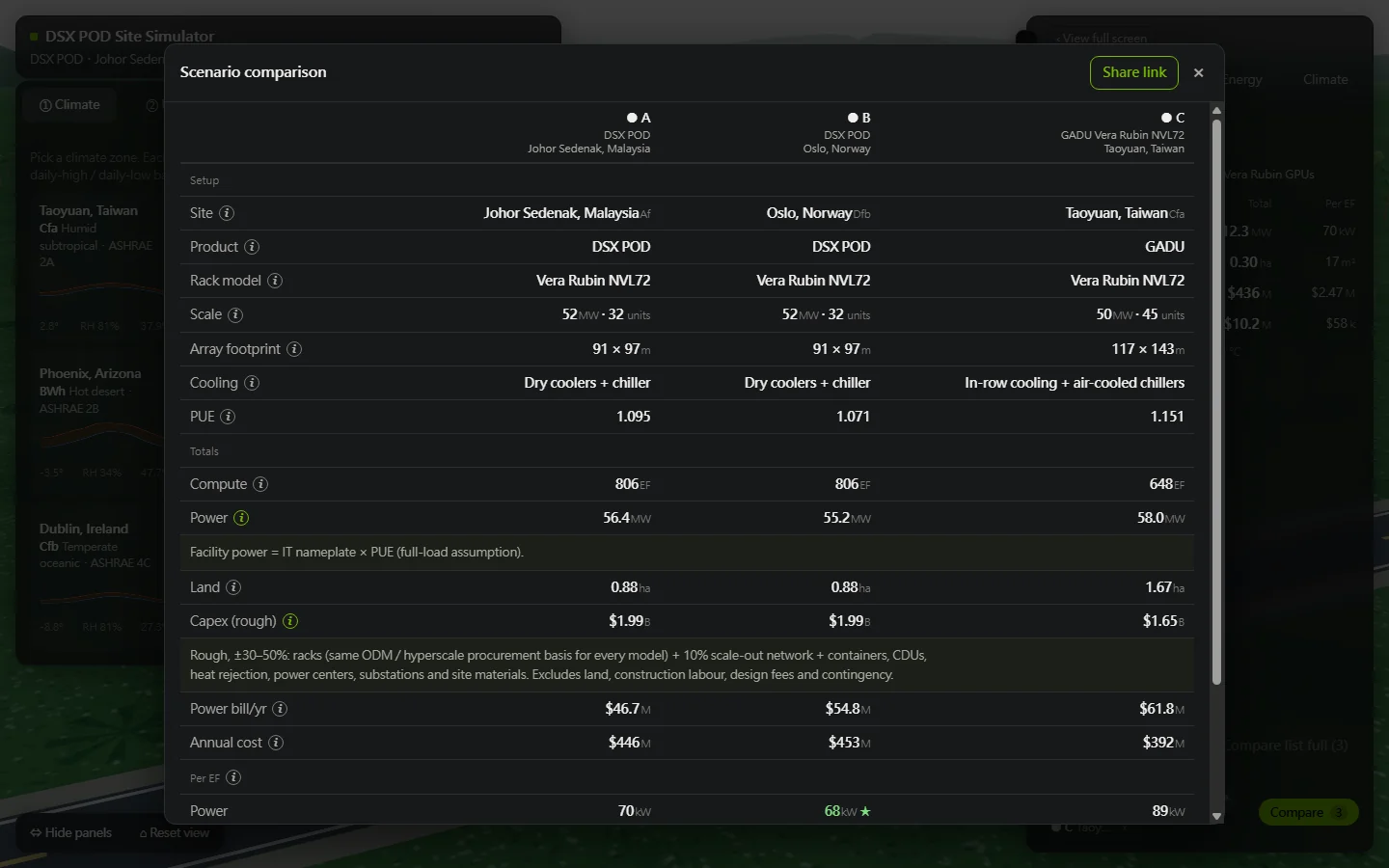
- Compare the results: use the 3D site, energy estimates and cost figures to understand how configurations differ.
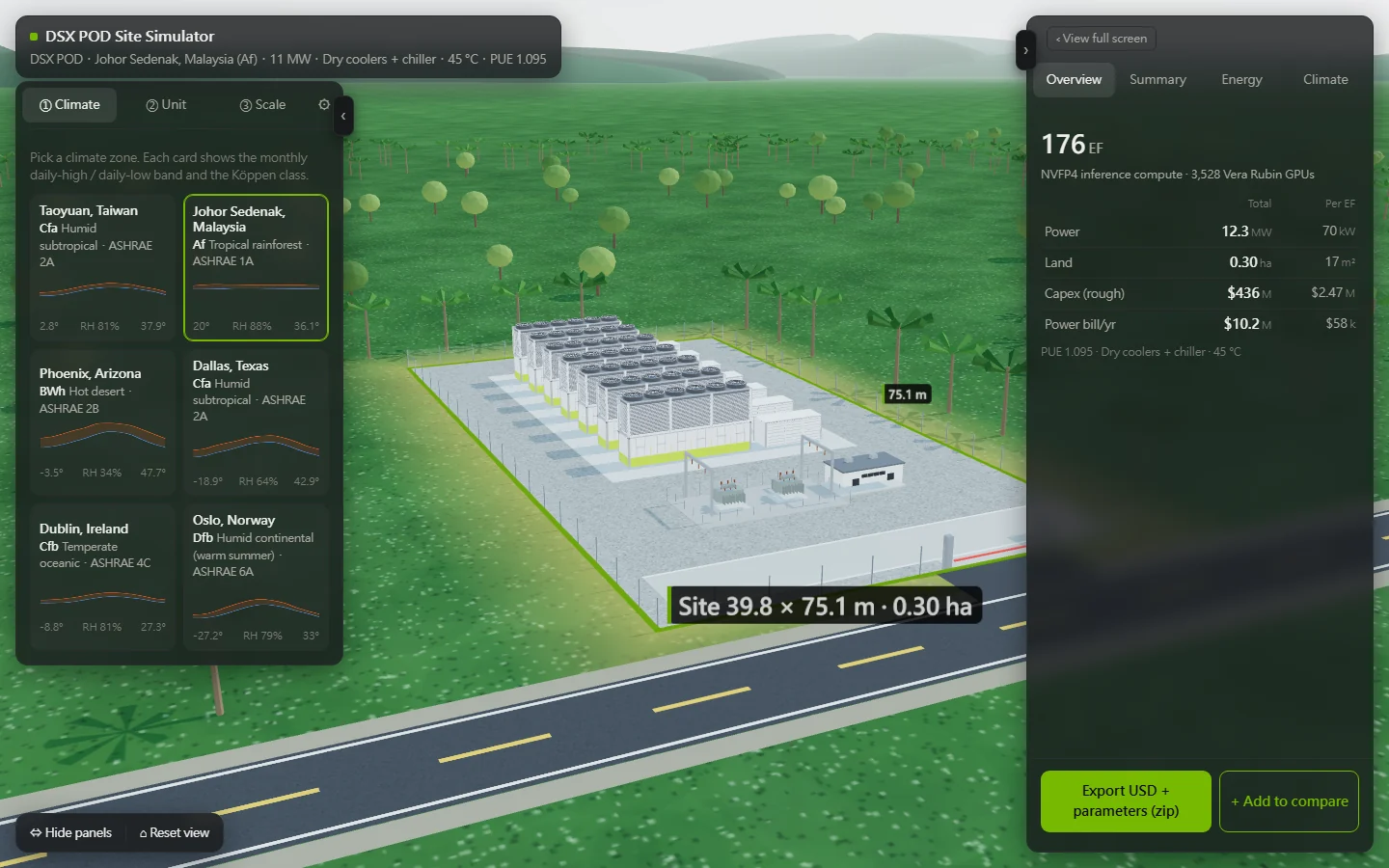
The sites were chosen using the Köppen climate classification and cover five representative climates: tropical rainforest (Johor, Af), hot desert (Phoenix, BWh), humid subtropical (Dallas, Cfa), temperate oceanic (Dublin, Cfb) and humid continental (Oslo, Dfb), plus Taoyuan (Cfa) as a local site in Taiwan. People can switch locations and scales, see how the site layout changes, and compare energy demand and estimated cost under different conditions.
The climate data also deliberately covers a long period: 20 years of hourly data from 2005 to 2024, spanning several El Niño and La Niña cycles, including the strong El Niño years of 2009, 2015 and 2023. Extreme weather does not show up every year, and an average over one or two years easily underestimates the hottest moments. So when the tool decides on cooling, it looks at the worst year as well as the 20-year average: if there is a single hour when the heat cannot be rejected, it adds a supplementary chiller. I did not reach further back because the climate keeps warming, and cooler decades would make future heat waves look milder than they will be.
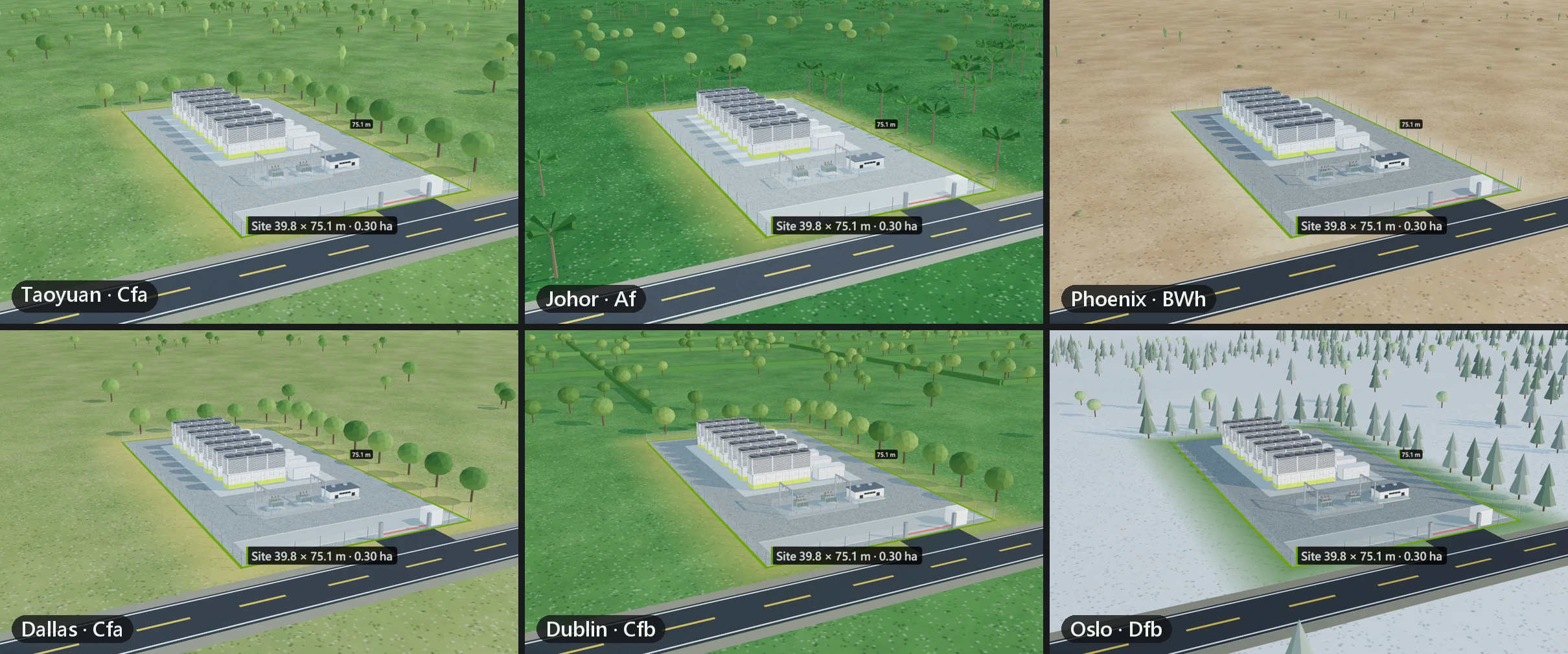
The key design idea is to let the 3D view and the data complement each other. The model helps people grasp spatial scale and equipment layout, while the dashboard shows the numbers that are hard to judge by eye. People can move between the two without piecing scattered information together themselves.
Making the 3D model the interface
In this project, the 3D view is the primary way to interact with the tool.
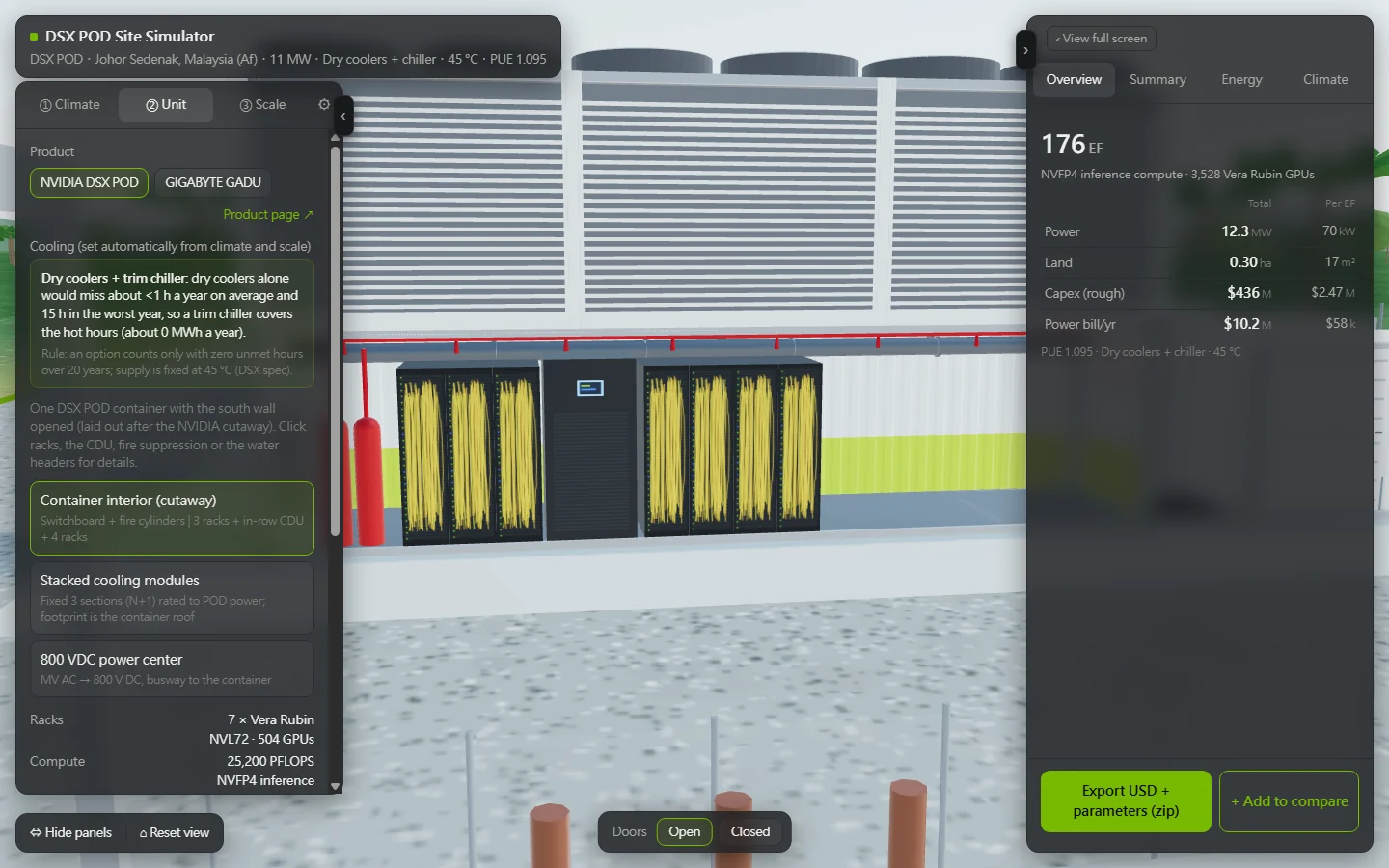
People can orbit the view, inspect the equipment layout, and see the results after changing the configuration. I also designed for the browser and for different screen sizes, so the tool works on both desktop and phone.
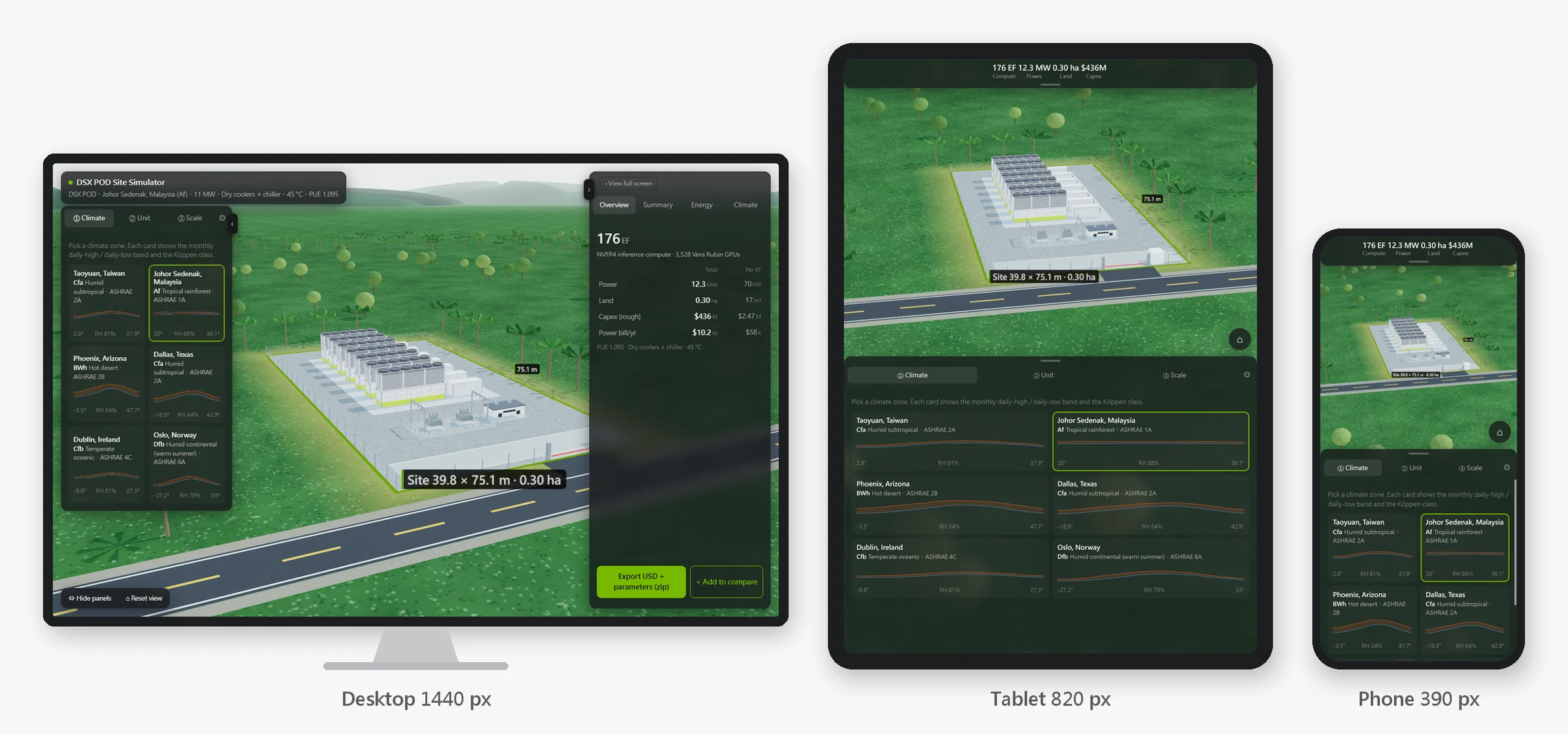
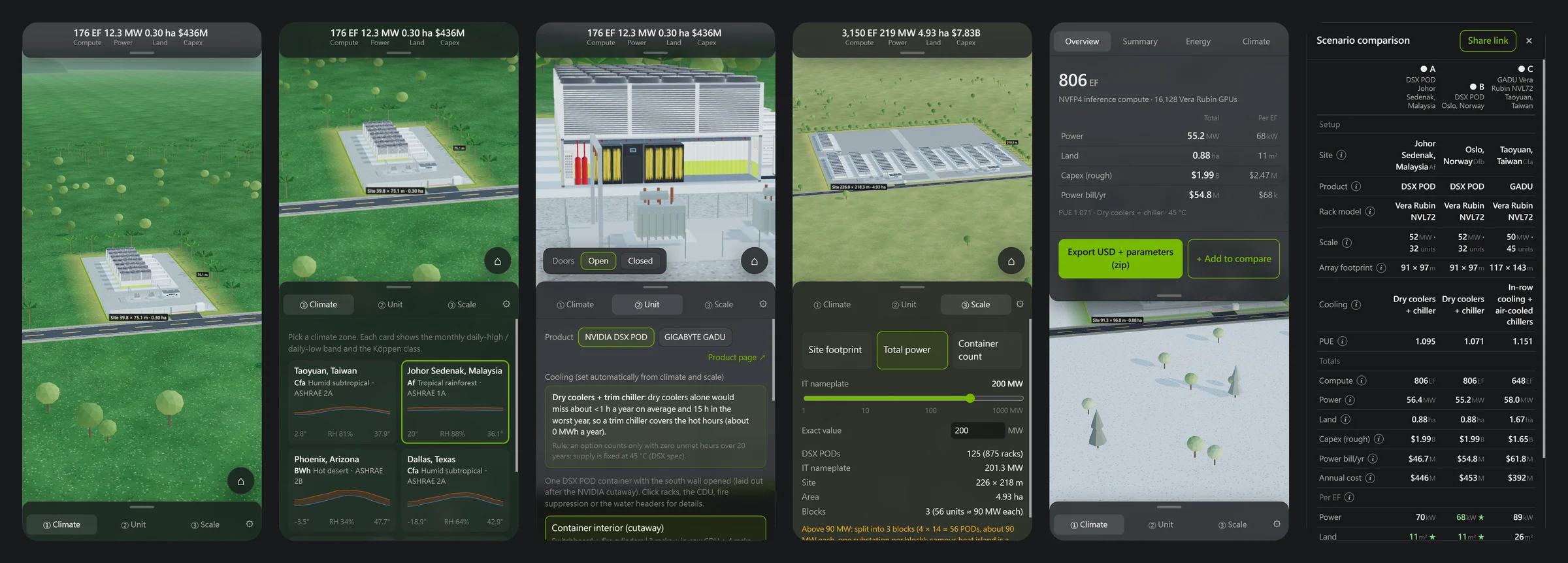
The full models inside digital-twin platforms are hard to bring straight into a web page. Scenes and rendering in tools like Omniverse need workstation-class GPUs, and putting them on the web usually means rendering on a server and streaming the frames, which ordinary browsers and phones struggle to support. So for the front end I chose three.js with simplified models, rendering in the visitor's own browser, and left the full model structure to the OpenUSD export. That means nothing to install and the tool opens directly on a phone. The rendering work happens on each visitor's own device, so the site only has to serve static files instead of keeping a GPU server for every visitor. All the scene models together come to about 200 KB, so loading stays light as well.
This meant balancing visual quality, responsiveness and performance. As the number of units grows, drawing and updating every object on its own soon drags the experience down, so part of the build was reworking how the scene is represented and rendered.
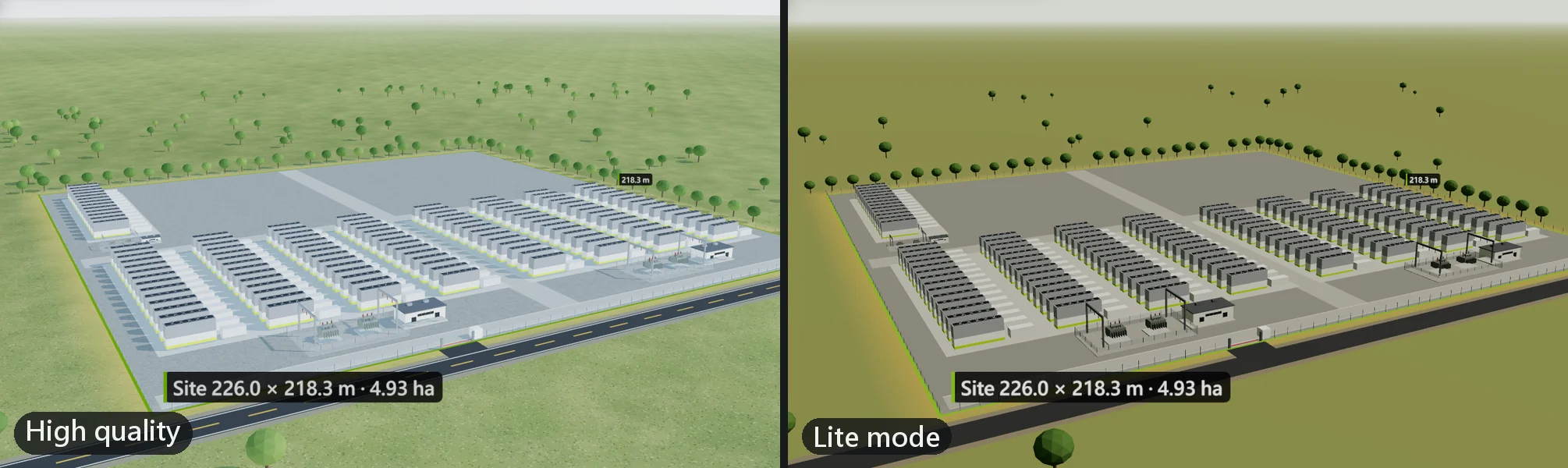
The scene also has a little micro-motion: warm air rising above the cooling modules and status lights blinking on the equipment, so the site reads as a facility that is running. To keep these effects from costing performance, I did not compute them frame by frame inside the 3D scene. They sit in a layer of web elements on top of the 3D canvas: the warm air is a handful of pre-drawn soft particles, the lights are small glowing dots, and their animations only change position and opacity, which the browser's compositor handles on its own. The 3D scene itself redraws only when the camera moves or the configuration changes, and stops computing once the view is still. Where each effect sits on screen is also recalculated only when the camera moves, and only the ones nearest the camera are shown. So the animation keeps playing while the device does not have to redraw the whole scene.

For me this was a genuinely interesting exploration. A 3D model does not have to live inside professional modeling software; it can also be a product interface that anyone can use in a browser.
From site exploration to OpenUSD
Another goal was to let the model leave the browser.
OpenUSD offers a way to describe and organize 3D scenes, so objects and their related data can be assembled in a structured form and carried into other 3D tools and workflows.
So I made export part of the product flow: people can save the current site configuration as a USD file and open it in NVIDIA Omniverse USD Composer.
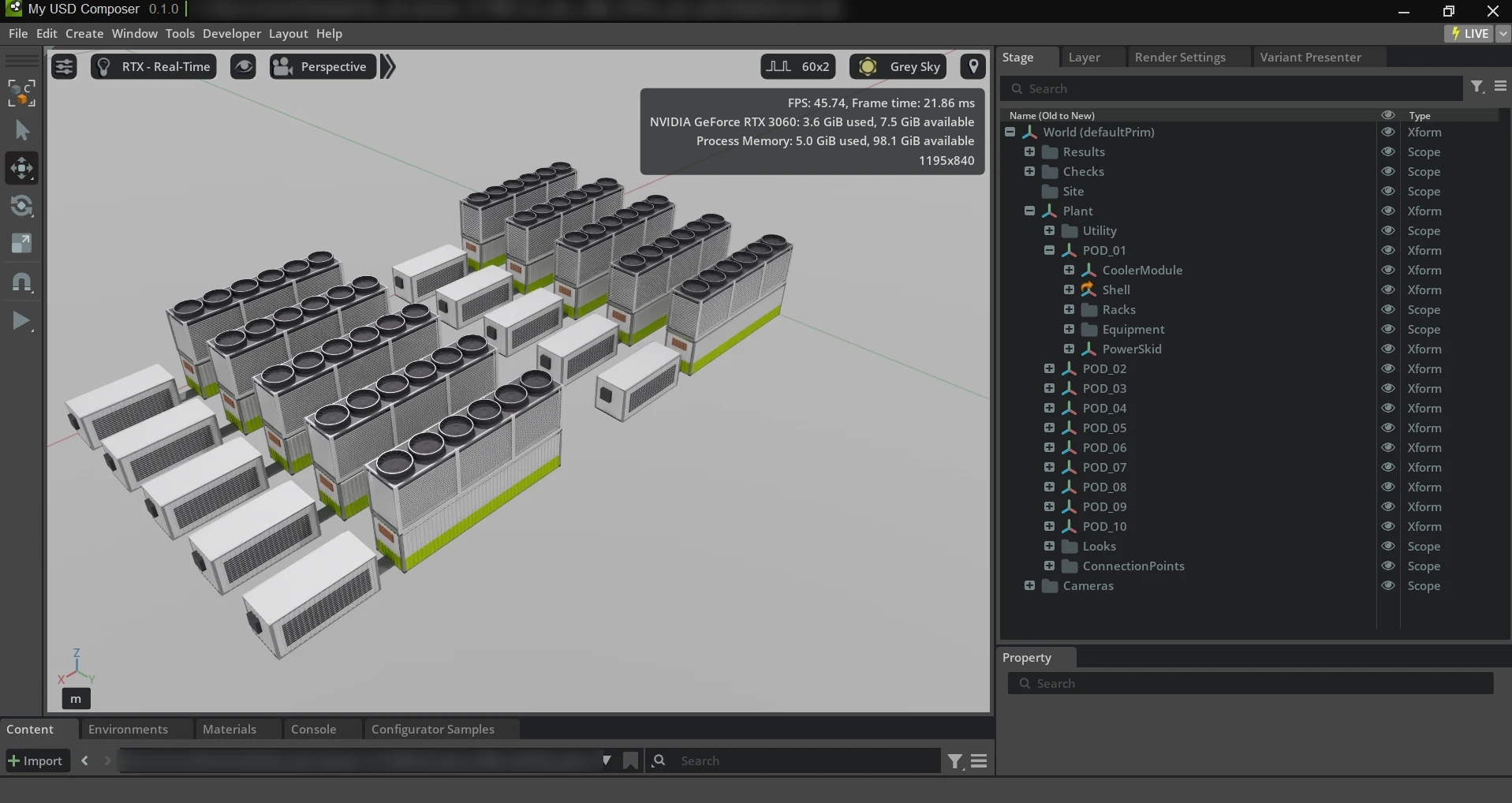
This also made me rethink what the product delivers. Beyond showing results in the interface, whether people can carry the data and the model into their next working environment shapes how useful the tool really is.
I completed the USD export pipeline, confirmed that the files open in USD Composer, and that they pass the Omniverse Asset Validator checks. That means the file structure and the basic export process meet those tools' requirements; whether the model meets real engineering needs still has to be verified separately.
Keeping the data and the model consistent
The prototype brings together site layout, equipment specs, climate data and calculated results. When the same configuration has to appear in different environments, keeping the data and the model consistent with each other was a problem I had to solve during the build.
I set up basic automated checks to confirm that equipment counts and related results line up across configurations, and tested many scales rather than letting it look right in only a handful of cases.
Along the way I did run into cases where the equipment layout and the count disagreed. It was a reminder that even when the picture looks reasonable, I cannot assume the data behind it is correct. For a product that presents visuals and numbers together, validation is part of product quality.
Current limits
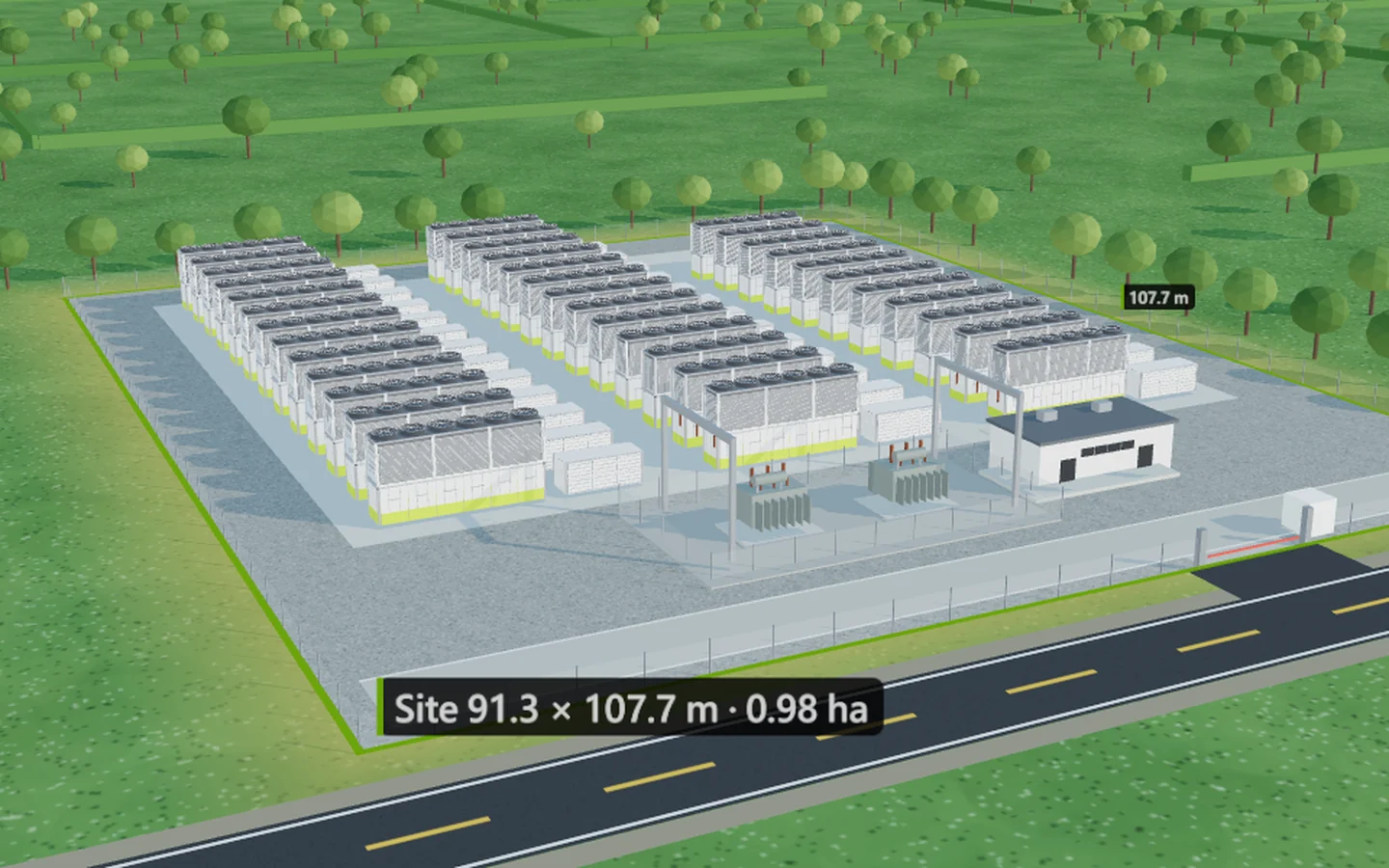
This project is an interactive prototype for exploring how site layout, energy use and cost relate to each other. It is not a formal engineering simulation system.
Energy and cost results are estimates based on the data, assumptions and simplified models currently in use. Real data centers also depend on equipment specs, load variation, cooling design, electricity prices and construction conditions, so the numbers suit early comparisons and should not be used directly for engineering decisions.
Likewise, a successful OpenUSD export and validation does not mean the model carries complete engineering information or digital-twin capability. What I built is a prototype workflow that can be operated, exported and opened in a specific tool, and there is plenty of room to take it further.
From design to implementation
This project gave me a chance to extend what I had learned so far into 3D, spatial data and new technical workflows.
From how people understand information and adjust conditions, to how they compare results and keep working with the model, every step had to weigh the product experience against technical constraints. My background in architecture, urban design and BIM helped me reason about space and models, while five years of product design kept me looking at the whole through interaction flow, information hierarchy and context of use.
I also learned OpenUSD along the way and built the prototype with AI-assisted development. For me it was both an experiment with 3D technology and an exercise in turning a new technology into a usable product.
Outcome: a browser-based interactive 3D site simulator, site and equipment configuration, energy and cost estimates, and an OpenUSD export pipeline that opens in NVIDIA Omniverse USD Composer.
Next, I want to keep exploring how 3D models, data and interactive interfaces relate, and how tools like this can become easier to understand, compare and carry into real workflows.